How to Schedule Messages on Google Chat: A Step-by-Step Guide
Google Chat introduced scheduled messages in December 2025, allowing users to send messages at a later date or time, up to 120 days in advance. The feature allo...
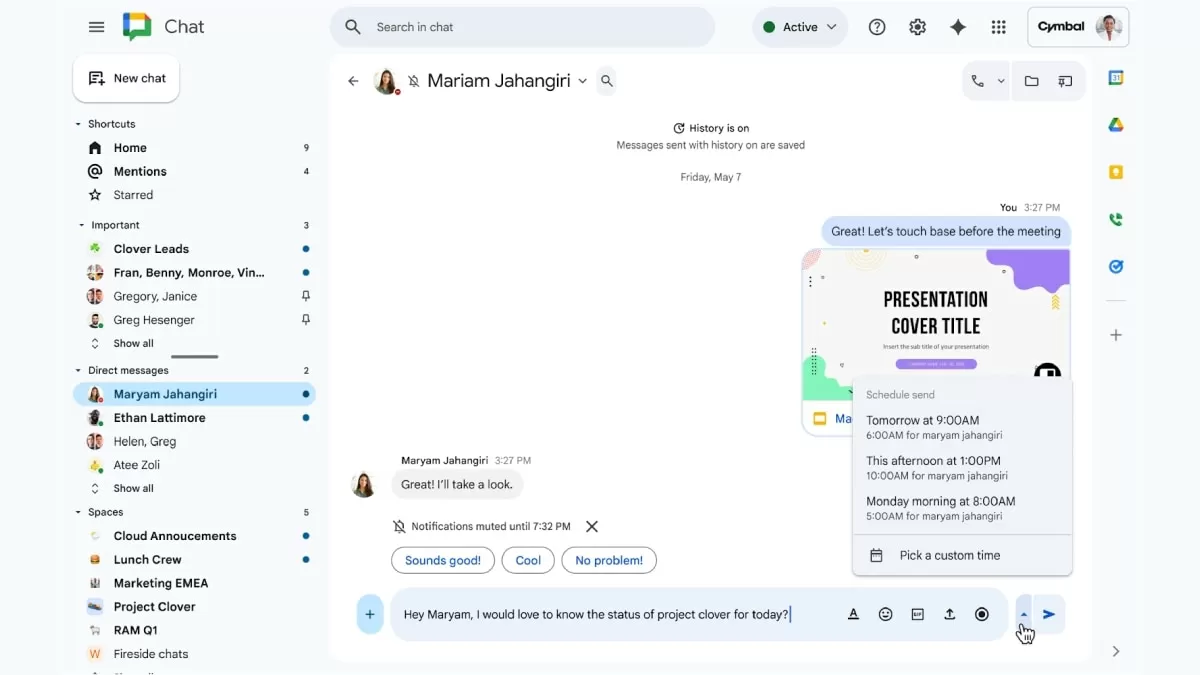
In today's fast-paced world, effective communication is key. With the rise of remote work and global teams, keeping in touch with colleagues, friends, and family across different time zones has become more important than ever. In December 2025, Google Chat introduced a new feature that aims to make communication easier and more convenient for its users – scheduled messages. This feature allows users to send messages at a later date or time, up to 120 days in advance. Let's take a closer look at how this new feature works and how it can benefit users.
The ability to schedule messages has been a highly requested feature by Google Chat users for a long time. With the introduction of this feature, users can now plan and organize their messages in advance, avoiding the hassle of remembering to send a message at a specific time. This feature is particularly useful for busy professionals who have multiple tasks to juggle and may not have the time to send a message in real-time.
One of the main advantages of scheduled messages is the ability to communicate effectively across different time zones. With teams and clients spread across the globe, it can be challenging to find a suitable time to communicate in real-time. With the scheduled messages feature, users can now schedule messages to be delivered at a time that is convenient for the recipient, without having to worry about the time difference. This not only saves time but also ensures that important messages are not missed.
Additionally, this feature also helps to avoid off-hour messages. We have all been in a situation where we receive a message from a colleague or client during non-working hours. It can be tempting to respond immediately, but it can also disrupt our personal time. With the scheduled messages feature, users can now schedule messages to be delivered during working hours, ensuring that everyone respects each other's personal time.
The process of scheduling messages on Google Chat is simple and user-friendly. It can be done on both desktop and mobile devices. Users can select a specific date and time before sending the message. The scheduled messages will then appear under a banner and Drafts section, where they can be edited, rescheduled, sent immediately, or cancelled before delivery. This gives users the flexibility to make any last-minute changes or adjustments before the message is sent.
Furthermore, the scheduled messages feature also allows users to stay organized. With the ability to schedule messages in advance, users can plan their communication and stay on top of their tasks. This is particularly useful for professionals who have a busy schedule and need to communicate with multiple people throughout the day. By scheduling messages, users can avoid the stress of trying to remember to send a message and can focus on other important tasks.
Google Chat's scheduled messages feature is not only beneficial for professionals but also for individuals who want to stay connected with their friends and family. Birthdays, anniversaries, and other important events can now be remembered and celebrated with a personalized message sent at the right time. With this feature, users can also avoid the last-minute rush of sending a message, ensuring that their loved ones feel appreciated and remembered.
In conclusion, Google Chat's introduction of scheduled messages in December 2025 is a game-changer in the world of communication. This new feature allows users to plan and organize their messages in advance, making communication more efficient and convenient. With the ability to schedule messages across time zones, avoid off-hour messages, and stay organized, this feature is a must-have for anyone looking to improve their communication skills. So why wait? Start scheduling your messages on Google Chat today and experience the benefits for yourself.